
Native Android game ports for Pocket Duo: directories and what to check
Find Android source ports, decompilation ports and static recompilations, where to get each official APK, and what's known about running them on the Duo.
In this guide
Look for a native Android port when you want to play a particular game without running it inside a console emulator. Start from an Android-focused directory, then follow the listing to the developer’s own documentation and release. What you want is a usable Android package and a test on hardware and a game close to yours; a game’s name appearing in a list isn’t enough.
If this is your first Android handheld, begin with the quick start glossary: it explains APKs, game files and emulators before this guide compares the different kinds of port.
Understand the kind of port you are installing
A source port adapts an available engine or its reimplementation to a new platform. A decompilation-based port builds on reconstructed game source. A static recompilation translates a particular game’s machine code ahead of time so it can be built for another architecture. A decompilation research project can exist long before there is an Android app to install.
These approaches may keep code that implements the original platform’s APIs, graphics or other services, so “native” doesn’t guarantee perfect graphics, faster gameplay or a finished game. A Windows game running through a compatibility and translation stack belongs in the PC gaming options instead.
Use these directories to find candidates
Awesome Android Native Ports is a good place to start. Its sections separate engines, decompilation ports and recompilations, with links to each project, and the list itself warns that some entries are young, experimental or limited to particular GPUs. Check each project before installing it.
DroidPorts offers another way to browse Android ports and their stated status. Follow its project links, then compare the directory’s claim with the current upstream README, because a “playable” label can come from different hardware or a short sample.
FanGamesDB’s Android list is a broader list of ports and fan games. Those are different kinds of project, so check how each one works and which game files it needs before comparing two entries.
Check Android support at the original project
Before installing a candidate, answer five questions:
- Is there an Android release? Find an APK or a documented Android build process. A desktop download or a decompilation percentage doesn’t count.
- Which device and Android version does it target? Look for ARM64, renderer and GPU requirements. Keep regular Duo, Duo Lite and other handheld results apart.
- Which game files does it require? Note the edition or region if specified. Many ports need data from your own copy.
- What was tested? A title screen, a short level test and a full playthrough tell you very different things.
- Where are saves stored? Check export instructions before changing packages or uninstalling an experimental build.
Apply that check to three Xbox examples
OpenCE documents Android game-data import and controllers. Black for Android describes its ARM64 recompilation and required game data. Both are real Android projects worth trying, with no Duo performance results yet.
JSRF Unleashed’s Android section is a useful counterexample: it includes an APK but says the Android build had only been tested in an Android emulator, which matters more than a directory calling it playable. Mention that when you recommend it, and use the Xbox guide to compare the available routes for your game.
Wind Waker HD has an Android recompilation route
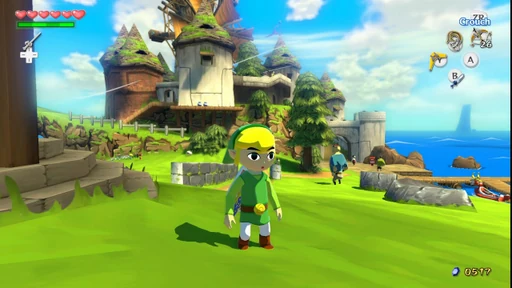
Wind Waker HD Recomp provides an Android ARM64 setup APK. Its Android documentation requires Android 13 or newer and Vulkan 1.3, or a suitable custom Adreno driver. You supply your own Wii U game dump; the app prepares the game code on the device before playing. Allow time for that first setup and keep an in-game save before updating.
OJAYSAN demonstrates a native Android recompilation on a regular Duo, with the TV picture on top and GamePad view below. The short opening-area sample is reported around 30 fps. At 12:49 they correct an earlier 2× guess to 1× / 720p. The exact app fork, build and custom driver aren’t identified, so this is a promising example rather than a verified recipe for the upstream APK.
Check which project you install. The GreenNaugahyde Android fork has its own APKs, requirements and update history. Its version numbers don’t identify the upstream build or the package used in the video. The Wind Waker HD game notes keep these native results separate from Cemu emulation results.
Apps in this guide
Latest releases. A video may have used an older version.
Sources
- Wind Waker HD Recomp Android requirements and setup
- GreenNaugahyde Android fork and its separate requirements
- OJAYSAN: Wind Waker HD recompilation on regular Duo
- Awesome Android Native Ports
- DroidPorts directory and project links
- FanGamesDB Android directory
- OpenCE Android requirements, imports and limits
- Black for Android implementation and installation
- JSRF Unleashed Android test coverage
Related game notes
Card screenshots come from Libretro, not from a Duo.
All game notes

